
The R15 and R16+ LMC 8.4 config indexes specify /LMC8.4/ in shared internal storage. In a file manager, create LMC8.4 beside DCIM and Download. The slash describes the storage root, not Android’s system filesystem root.
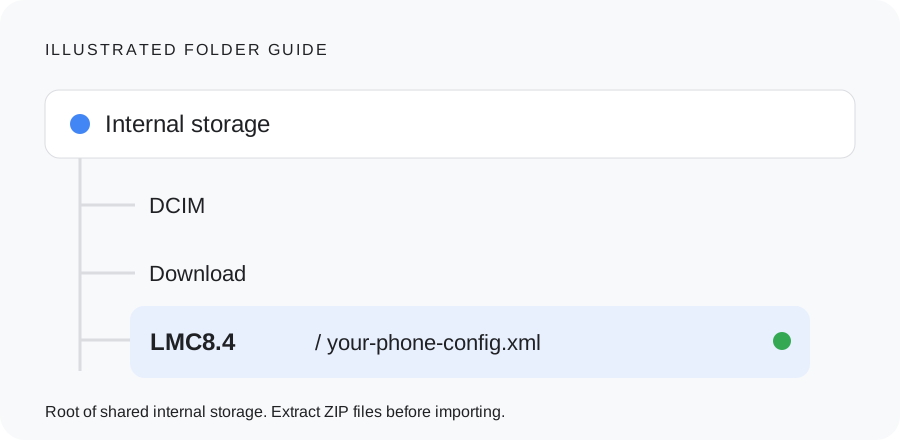
Use the LMC path for these indexed releases
This is typically shown as /storage/emulated/0/LMC8.4/ for the primary Android user. The file manager’s “Internal storage” label is more useful than typing a system path, because storage mounts and user profiles can differ.
Why a generic GCam folder can be wrong
| Build family | Documented directory |
|---|---|
| LMC 8.4 R15 / R16+ indexes | /LMC8.4/ |
| Generic GCam 8.x examples | /GCam/Configs 8/ |
| Generic GCam 7.x examples | /GCam/Configs 7/ |
| Generic GCam 6.x examples | /GCam/Configs/ |
Mod-specific instructions take priority. Do not create every directory in this table. Older LMC builds and other branches need their own source check; the 8.4 folder is not a blanket instruction for 8.8 or 9.6.
A quick folder check
- Verify the folder is directly in shared internal storage rather than inside Download or Android/data.
- Extract archives and check for a doubled extension such as preset.xml.txt.
- Save a config from the app’s settings and find the new file in your file manager. This shows the directory used by that build.
- Review XML storage access if the file exists but the chooser is empty. Follow the XML guide’s Android-version caveats.
Next step
Follow the complete XML import guide to back up settings and restore your matched file.
Make the next step easy to verify
Check these three look-alike paths
Internal storage / LMC8.4 / preset.xmlThe XML sits directly inside the folder.
Download / LMC8.4 / preset.xmlThis folder is still inside Download, not at the storage root specified by the indexes.
LMC8.4 / preset.zipExtract the archive and move its actual XML. Changing an extension does not convert a ZIP.
An app export is the practical tie-breaker when an older or different branch uses another path. Use a file manager to locate the saved file; do not place configs in Android’s system root or assume an Android/data directory belongs to the current app.
Keep a simple setup record
Save these details with your backup. They make it possible to repeat a working setup or describe a problem accurately.
________________________
________________________
________________________
________________________
________________________
________________________
Copy this checklist into your own notes. This page does not submit or save your device information.