
On stock OxygenOS with 8T, 8 Pro or 9R, follow the documented snapcam/aweme advice and check auxiliary-camera access before comparing color.
LMC 8.4 for OnePlus: Device Evidence & XML Configs
LMC 8.4 for OnePlus: check the package, library and Nord suffix
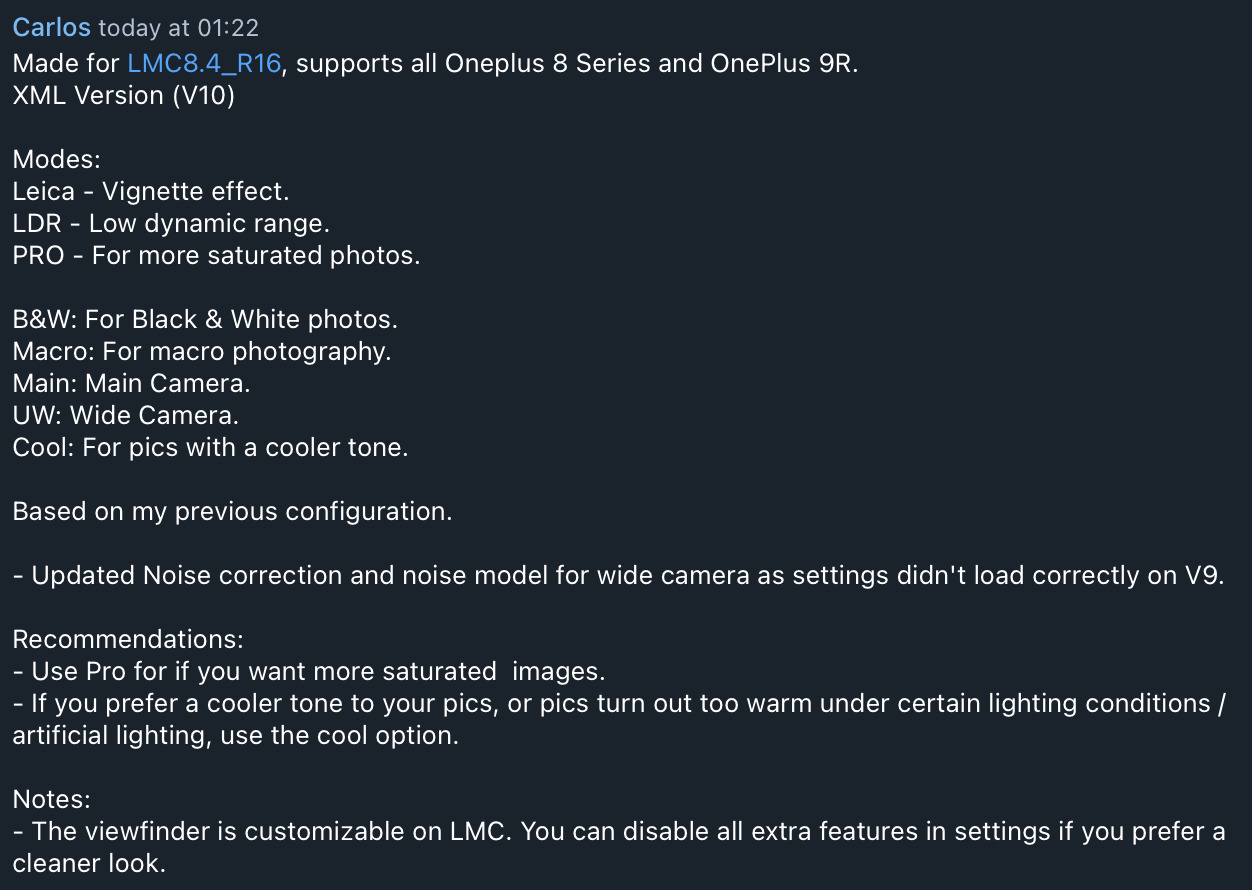
OnePlus instructions are unusually specific in places. The 8T, 8 Pro and 9R indexes recommend snapcam or aweme on stock OxygenOS, and Carlos V10's instructions identify R16. The OnePlus 11 profile pairs its XML with a named .so library. Carlos V2 for OnePlus 12 is made on R18F1 aweme and documents a startup workaround. Nord CE 3, CE 3 Lite, CE 4 and CE 4 Lite each need their own exact entry.
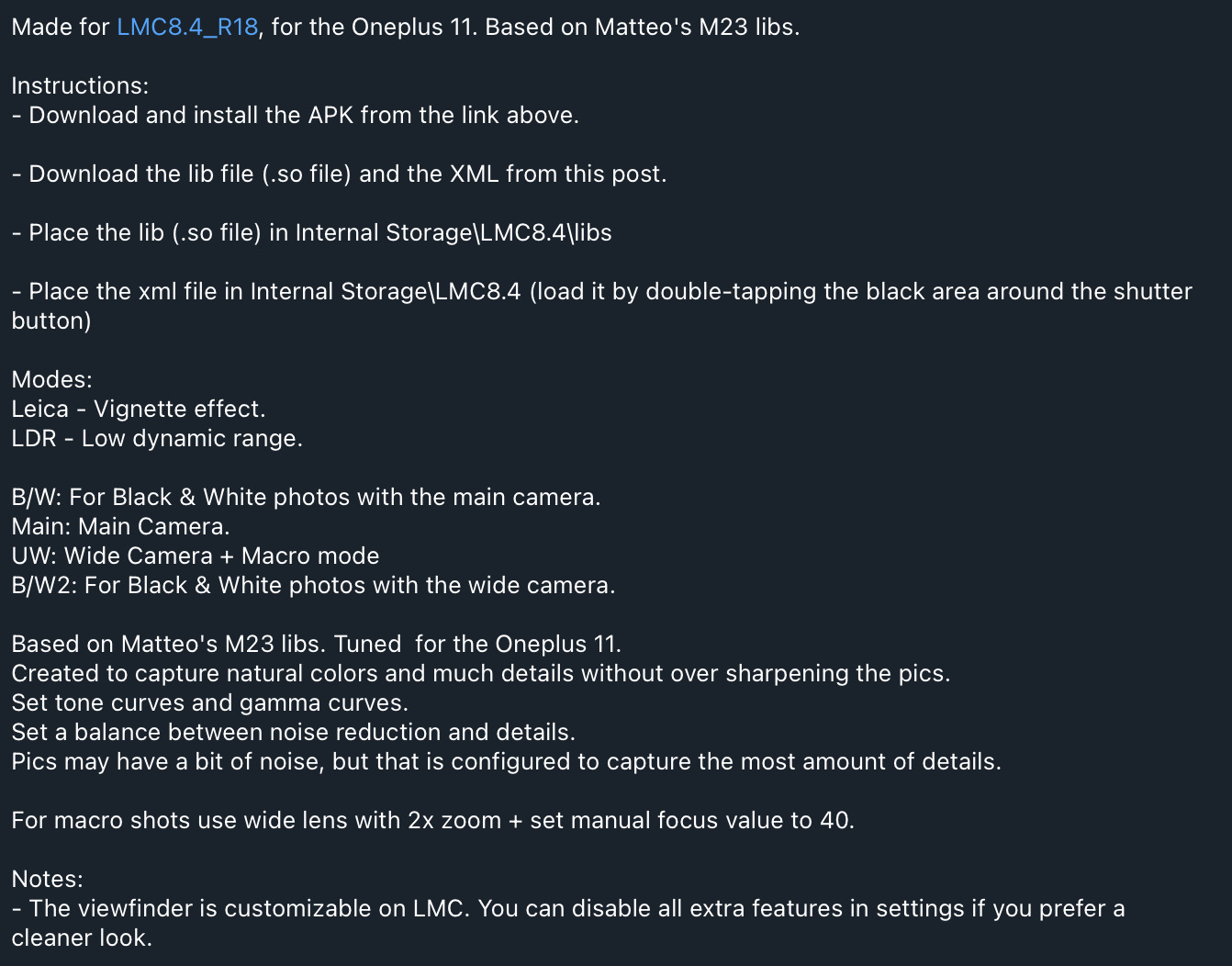
For OnePlus 11, prepare both the XML and its accompanying M23 x OP11.so library; importing the XML alone omits a documented component.
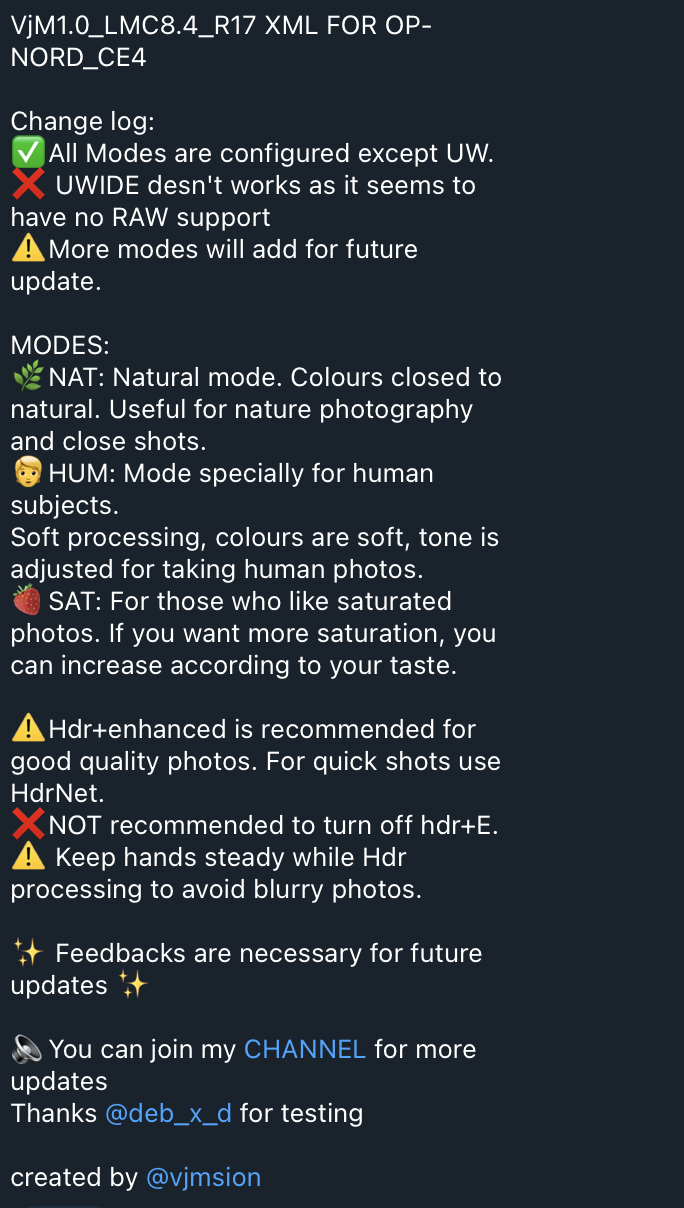
For Nord CE 4, VjM1.0's R17 read-me reports ultrawide unavailable. NAT, HUM and SAT are processing choices rather than evidence of additional lenses.
Package and firmware guidance
Use snapcam or aweme where the 8T/8 Pro/9R stock-OOS entries explicitly require it. The OnePlus 12 Carlos V2 instructions specifically use aweme on R18F1. The current sources do not supply the same package rule for every OnePlus model or custom ROM.
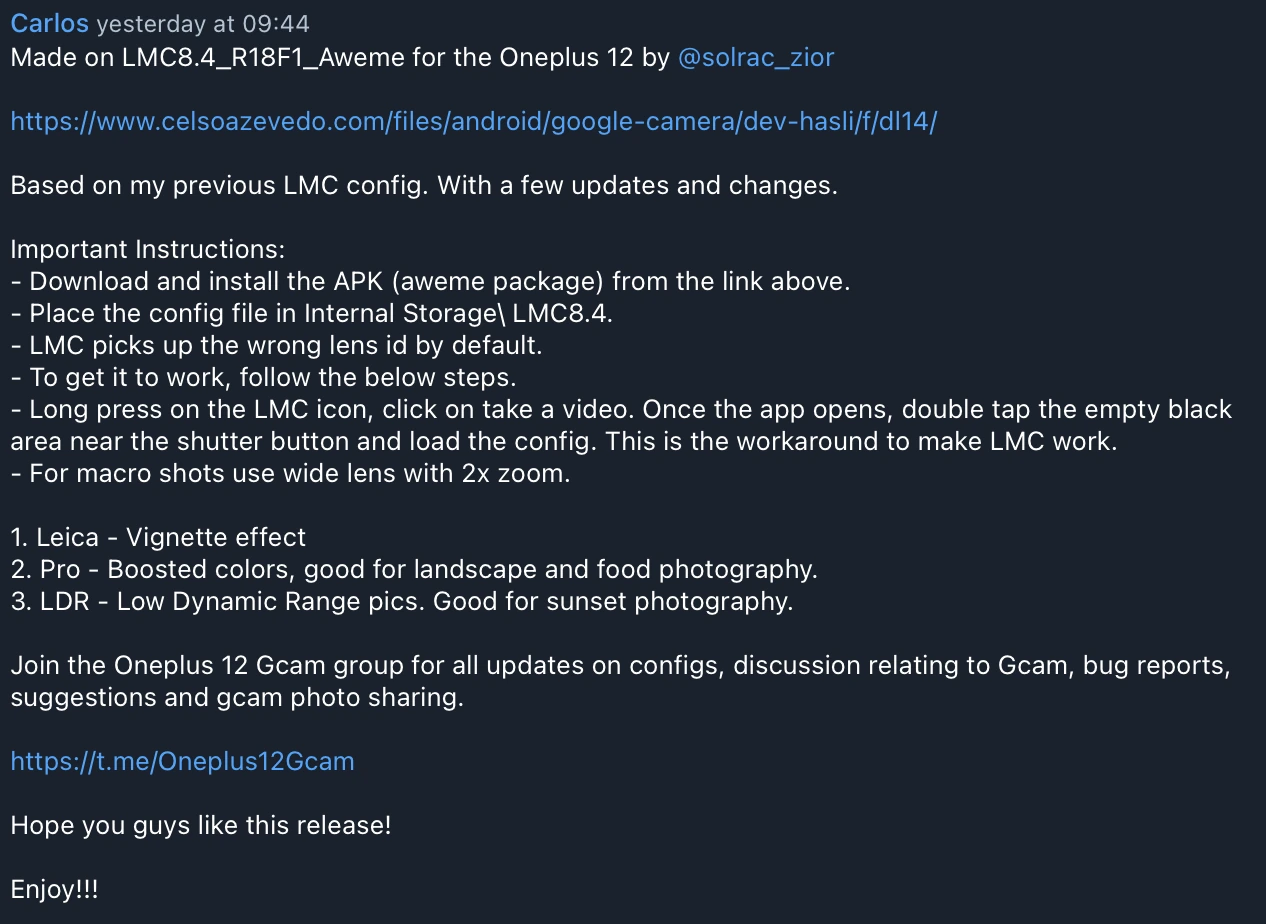
Check the contributor's startup instructions before treating a launch failure as general incompatibility. For OnePlus 12 Carlos V2, the contributor opens the video shortcut to load the XML because the default lens ID is wrong.
Read the instructions for this specific profile
Does the Nord CE 4 Lite file work on Nord CE 4?
That substitution is not supported by this catalog. A Lite-named file mixed into the CE 4 heading is excluded from CE 4 recommendations.
Why does OnePlus 11 need a library as well as XML?
The contributor explicitly pairs Carlos-V1-LMC-OP11.xml with M23 x OP11.so. Place the library under /LMC8.4/libs/ and the XML under /LMC8.4/ as documented.
Source notes: Hasli LMC8.4 R16+ community config index ↗ Hasli LMC8.4 R15 community config index ↗ Carlos V10 OnePlus 8 series / 9R instructions ↗ Carlos OnePlus 11 R18 library and button instructions ↗ Carlos V2 OnePlus 12 R18F1 aweme instructions ↗ VjM1.0 Nord CE4 R17 read-me ↗
Read the model-specific community evidence for OnePlus. A successful setup on another regional variant, ROM or Android version may not transfer to your phone.
Choose an exact match
Use your device’s model code and chipset where the source distinguishes variants. The entries below retain release assignments, package recommendations and unresolved details. No model in this guide was tested by us.
Try defaults first, export working settings, then import a sourced XML. Follow the installation guide and XML setup. Select the documented package rather than guessing from the phone brand.
7 matching devices. Community evidence; check the variant details.
Community XML referenceFounder-reported APK testing
OnePlus 8T
Start here
For the documented Carlos V10 starting point, use R16 and a stock-OOS snapcam/aweme package as described by the source. Establish ordinary main-camera capture before changing the style buttons.
Choosing the configCarlos-V10-LMC-8T-9R.xml has fuller instructions than the selected older alternatives. Its wide-camera noise-model changes and R16 origin are contributor information rather than measured improvements here.
Model-specific setup checks
Check package before replacing the XML
If auxiliary controls are missing on stock OxygenOS, confirm whether the installed package is snapcam or aweme as documented. A different style XML alone does not settle camera access.
Use Cool for an actual warm-color problem
Carlos V10 describes Cool for warmer/artificial-light scenes and PRO for more saturated output. Compare a neutral object under indoor light before deciding which processing you prefer.
Check the wide camera after the update
V10's notes mention correcting wide-camera noise settings that had not loaded correctly in V9. Include a saved wide scene with shadows when comparing the supplied profile.
Test in this order
- Confirm R16 and the documented package for stock OxygenOS.
- Load Carlos V10 and save main/front photos.
- Check wide output, then compare normal versus Cool under indoor light.
Keep separate: OnePlus 8 Pro for the 8T/9R XML; OnePlus 9; OnePlus 9 Pro
Which package does the 8T source recommend?
Snapcam or aweme is documented for stock OxygenOS. Keep that scope visible; it is not a guarantee for every OxygenOS version or custom ROM.
Profile source / instructions ↗ Profile source / instructions ↗ Profile source / instructions ↗
Variant limits and source evidence (3)
Both indexes say snapcam or aweme is needed to access all cameras on stock OxygenOS. That recommendation has a stock-OOS scope and does not guarantee all cameras on every Android/OOS version.
Carlos-V10-LMC-8T-9R.xml
Release: R16
Package: snapcam or aweme on stock OxygenOS
Author: Not attributed in index
Carlos-V8-LMC-8T-9R.xml
Release: R15 index; exact release unconfirmed
Package: snapcam or aweme on stock OxygenOS
Author: Not attributed in index
One-Plus-8T-9R-10T-DSLR-Quality.xml
Release: R15 index; exact release unconfirmed
Package: snapcam or aweme on stock OxygenOS
Author: Not attributed in index
Community XML referenceFounder-reported APK testing
OnePlus 8 Pro
Start here
For the instruction-rich V10 setup, use Carlos-V10-LMC-8Pro.xml with its R16 origin and the documented snapcam/aweme advice on stock OxygenOS.
Choosing the configKeep the 8Pro V10 file separate from the shared 8T/9R file. If using the older NiCkAM choices, compare the DSLR speed-labelled and SHARP quality-labelled files against your own capture needs.
Model-specific setup checks
Use the 8Pro-specific V10 file
The current index lists separate Carlos files for 8Pro and 8T/9R. Choose the exact model filename before adopting a shared-looking instruction sheet.
Compare speed with a moving subject
For the NiCkAM pair, make several similar everyday movement captures and count usable focused results. A source speed label is a starting hypothesis, not a measured result from this site.
Compare quality with static fine detail
Use the same stationary textured subject for the SHARP-labelled profile. Check halos, texture and shadow noise at equal size before deciding that more obvious sharpening means more useful detail.
Test in this order
- Confirm the exact 8 Pro file/package and save a V10 main reference.
- Check front and exposed auxiliary captures.
- If evaluating NiCkAM, compare moving-subject reliability separately from static-detail output.
Keep separate: OnePlus 8T; OnePlus 8 for 8Pro-specific files
Which NiCkAM 8 Pro file is for speed versus quality?
The source labels NiCkAM8PRO-V6.4-DSLR-LMC-R15.xml for speed and the SHARP version for quality. Compare them on the actual phone; this website has not measured those claims.
Profile source / instructions ↗ Profile source / instructions ↗ Profile source / instructions ↗
Variant limits and source evidence (3)
Both indexes say snapcam or aweme is needed on stock OxygenOS. Older NiCkAM files are presented as speed and quality options; they are source community profiles, not measured comparisons by this site.
Carlos-V10-LMC-8Pro.xml
Release: R16
Package: snapcam or aweme on stock OxygenOS
Author: Not attributed in index
NiCkAM8PRO-V6.4-DSLR-LMC-R15.xml
Release: R15 index; exact release unconfirmed
Package: snapcam or aweme on stock OxygenOS
Author: Not attributed in index
NiCkAM8PRO-V6.4-SHARP-LMC-R15.xml
Release: R15 index; exact release unconfirmed
Package: snapcam or aweme on stock OxygenOS
Author: Not attributed in index
Community XML referenceFounder-reported APK testing
OnePlus 9R
Start here
Use the documented 9R/8T V10 file with its R16 origin, then check the installed stock-OOS package before exploring auxiliary controls.
Choosing the configV10 provides the fuller documented baseline. Carlos V8 and the shared DSLR-labelled older file are alternative community profiles, so retain their older-index scope during comparisons.
Model-specific setup checks
Keep the R in the model selection
OnePlus 9, 9 Pro and 9R have separate source entries. Select 9R explicitly; the numerical 9 label is not enough to choose a file.
Check warm indoor color with Cool
V10's Cool option is described for overly warm/artificial-light output. Compare a white object and a face in the same indoor scene before changing the default color processing.
Keep the DSLR alternative a separate look test
Load the older DSLR-labelled file only after saving the working V10 setup. Compare color and fine detail on the same scene rather than combining settings from both profiles.
Test in this order
- Confirm exact 9R, R16 and the documented stock-OOS package.
- Save main/front/auxiliary samples with V10.
- Compare normal/Cool indoors, then try an older alternative only if it solves a specific preference.
Keep separate: OnePlus 9; OnePlus 9 Pro; OnePlus 9RT
Profile source / instructions ↗ Profile source / instructions ↗ Profile source / instructions ↗
Variant limits and source evidence (3)
Both indexes say snapcam or aweme is needed to access all cameras on stock OxygenOS. The source shares the Carlos profile between 8T and 9R; that does not verify 9/9 Pro or all OOS versions.
Carlos-V10-LMC-8T-9R.xml
Release: R16
Package: snapcam or aweme on stock OxygenOS
Author: Not attributed in index
Carlos-V8-LMC-8T-9R.xml
Release: R15 index; exact release unconfirmed
Package: snapcam or aweme on stock OxygenOS
Author: Not attributed in index
One-Plus-8T-9R-10T-DSLR-Quality.xml
Release: R15 index; exact release unconfirmed
Package: snapcam or aweme on stock OxygenOS
Author: Not attributed in index
Community XML referenceFounder-reported APK testing
OnePlus 11
Start here
Use the documented R18 setup with both components: put M23 x OP11.so under /LMC8.4/libs/ and Carlos-V1-LMC-OP11.xml under /LMC8.4/, then import the XML from the shutter-area chooser.
Choosing the configThis is the exact OnePlus 11 profile in the catalog. Its library is an explicit dependency; the XML alone is not the complete documented setup.
Model-specific setup checks
Prepare the library before importing
Keep the .so filename unchanged and place it in /LMC8.4/libs/. If the imported output is wrong, confirm both files and paths before changing color or noise settings.
Learn the color and black-and-white controls
The instructions distinguish Main, UW, B/W for the main camera and B/W2 for the wide camera. Confirm ordinary color capture before comparing the monochrome variants.
Treat the macro recipe as profile-specific
The contributor suggests wide camera, 2x zoom and manual focus 40 for macro. Try that only after wide capture works, and adjust the subject distance using the saved focus result.
Test in this order
- Confirm R18 and place XML/library in their separate documented folders.
- Import and save ordinary Main and UW samples.
- Check B/W and B/W2 separately, then test the contributor's macro recipe on a stationary subject.
Keep separate: OnePlus 11R; OnePlus 12
Where does the OnePlus 11 .so library go?
The contributor specifies Internal storage/LMC8.4/libs/ for M23 x OP11.so, with the XML one level above in /LMC8.4/.
Is Leica mode a separate camera in this OnePlus 11 XML?
The instructions describe Leica as a vignette effect. The lens controls and creative effects are separate choices.
Profile source / instructions ↗ Profile source / instructions ↗
Variant limits and source evidence (1)
The index requires the accompanying M23 x OP11.so library and reports tested on R18. Its how-to image was not retrievable in this research pass. Do not present the XML alone as a fully verified setup.
Carlos-V1-LMC-OP11.xml
Release: R18
Package: No verified package recommendation
Author: Not attributed in index
Community XML referenceFounder-reported APK testing
OnePlus 12
Start here
Use the contributor's R18F1 aweme setup, place the XML in /LMC8.4/, long-press the app icon and choose Take a video. Once open, double-tap the empty black area near the shutter to load the file.
Choosing the configThe source's release, package and startup workaround make this a more reproducible recommendation than a generic OnePlus 12 XML claim. Keep it scoped to Carlos V2 and verify behavior on the actual firmware.
Model-specific setup checks
Use the documented startup route
A launch problem before XML import can reflect the contributor's wrong-default-lens-ID issue. Try the video shortcut and load the profile as instructed before declaring the whole setup unusable.
Choose creative controls deliberately
Carlos V2 describes Leica as a vignette, PRO as boosted color for landscape/food and LDR as a low-dynamic-range sunset option. Compare each with the ordinary result rather than enabling everything.
Check close focus with the supplied wide recipe
For macro, the instructions suggest the wide lens with 2x zoom. Test a stationary detailed subject after ordinary wide capture works, and inspect the saved focus instead of relying on the preview.
Test in this order
- Confirm R18F1 aweme and place the XML in /LMC8.4/.
- Open through Take a video if needed, import the XML and save ordinary main/wide photos.
- Compare one creative mode at a time, then check a short clip independently.
Keep separate: OnePlus 12R; OnePlus 11
LMC opens incorrectly on OnePlus 12 before loading the config. What can I try?
For Carlos V2, the contributor documents a wrong default lens ID. Long-press LMC, choose Take a video and import the XML from the shutter-area chooser. This is profile-specific community advice.
Profile source / instructions ↗ Profile source / instructions ↗
Variant limits and source evidence (1)
The source explicitly credits carlos and assigns R18. Additional instructions are an image link; their details have not been transcribed here. No full device/ROM test was performed by this site.
Carlos_V2_OP12.xml
Release: R18
Package: aweme (Carlos V2 instructions; made on R18F1)
Author: carlos
Community XML referenceFounder-reported APK testing
OnePlus Nord CE 3
Start here
Confirm Nord CE 3 without Lite, then use the exact older labs.xml listing as a limited community starting point. Preserve its unconfirmed exact-release status.
Choosing the configAn exact model heading is preferable to importing the current Lite entry. Being located in an R15 index does not itself prove that labs.xml was tested on R15 or later APKs.
Model-specific setup checks
Keep Lite out of the finder match
Check the full Settings model name before selecting a result. CE 3 and CE 3 Lite must return separate files even when a broad search omits the suffix.
Start with basic photo saving
The labs entry has little explanatory text. Save a daylight main photo and a selfie before exploring night/video or optional processing so that a failure has a clear starting point.
Keep the older-index scope visible
If you try labs.xml on a newer APK, record that as your own experiment with the actual version. Do not relabel it as a verified R18 profile because the import succeeds.
Test in this order
- Verify the non-Lite CE 3 identity and save default settings.
- Import labs.xml and save main/front comparisons.
- Test an optional mode only after those work, recording the APK/package and firmware.
Keep separate: OnePlus Nord CE 3 Lite; OnePlus Nord 3
Can I use the current CE 3 Lite XML on Nord CE 3?
That substitution is not supported. The exact CE 3 listing is labs.xml in the older index, while CE 3 Lite has its own entry.
Profile source / instructions ↗ Profile source / instructions ↗
Variant limits and source evidence (1)
The exact Nord CE3 listing appears in the R15 index only. The current index has Nord CE 3 Lite, which is a different phone. Do not substitute a Lite profile or imply verified R16/R17/R18 support.
labs.xml
Release: R15 index; exact release unconfirmed
Package: No verified package recommendation
Author: Not attributed in index
Community XML referenceFounder-reported APK testing
OnePlus Nord CE 4
Start here
For the best-documented candidate, pair VjM1.0_LMC8.4R17_OP-NCE4.xml with R17. Do not expect its ultrawide button to provide a working camera based on this profile's notes.
Choosing the configOnePlusNordCE4.xml is another exact-model community option. Prefer the VjM file when you need explained behavior, while keeping the ultrawide limitation visible. The CE4 Lite-named file mixed into the heading is excluded.
Model-specific setup checks
Pick the subject mode first
VjM's NAT is described for natural/nature or close subjects, HUM for people with softer processing and SAT for greater saturation. Compare a matching subject rather than treating them as extra lens choices.
Account for HDR capture time
The contributor recommends HDR+Enhanced for quality and HdrNet for quick shots, with steady hands during processing. Test a static scene before using the slower path for moving people.
Plan around the reported ultrawide limit
VjM says ultrawide does not work and suggests lack of RAW support as the contributor's explanation. Keep that explanation attributed; use a separate working camera path for wide shots.
Test in this order
- Verify non-Lite CE 4 5G and R17.
- Import VjM and compare NAT/HUM/SAT on appropriate stationary subjects.
- Check HDR+Enhanced versus HdrNet capture behavior; record ultrawide as unavailable if the documented limitation occurs.
Keep separate: OnePlus Nord CE 4 Lite; OnePlus Nord 4
Why is ultrawide missing with the Nord CE 4 VjM file?
Its read-me explicitly reports ultrawide unavailable and offers a contributor explanation about RAW support. This website has not independently verified that hardware/firmware diagnosis.
Profile source / instructions ↗ Profile source / instructions ↗
Variant limits and source evidence (2)
Current source heading is Nord CE 4 5G. It also contains a filename referring to CE4 Lite; that ambiguous file is excluded. Keep CE4 distinct from CE4 Lite, and do not infer exact tested release from filename alone.
OnePlusNordCE4.xml
Release: R16+ index; exact release unconfirmed
Package: No verified package recommendation
Author: Not attributed in index
VjM1.0_LMC8.4R17_OP-NCE4.xml
Release: R17
Package: No verified package recommendation
Author: Not attributed in index
No verified recommendation in our catalog. Check your exact variant and source notes; a similar model is not enough.
Keep a simple setup record
Save these details with your backup. They make it possible to repeat a working setup or describe a problem accurately.
Phone model / region
________________________
ROM and Android version
________________________
Full APK filename
________________________
Android package ID
________________________
XML filename / library
________________________
Lens and mode that you tested
________________________
Copy this checklist into your own notes. This page does not submit or save your device information.
Sources & review
Source access: 14 October 2026. Release dates are shown separately. APK testing is reported by founder Muzamil Ahad; individual phone-test records are not currently published.
Founder & APK reviewer: Muzamil Ahad. How the guide was researched · Report a correction.