
Match GT Neo 2 to the documented R16 or R18 file and GT Neo 3T to R17 or R18; keep the shared R15 file with its older scope.
LMC 8.4 for Realme: Device Evidence & XML Configs
LMC 8.4 for Realme: match the release and choose the intended look
Realme has both practical setup instructions and creative profiles. The 9 Pro+ offers a grounded-color/sharp-selfie option and a vibrant option; its older stock-OS entry recommends aweme. GT Neo 2 and GT Neo 3T have explicit release assignments, including a shared older R15 profile. Narzo 50's EyeCandy and Hazard files aim at visibly different color styles, so the useful choice depends on the subject and desired processing.
For 9 Pro+, compare a face and a neutral object before deciding whether the sharper/grounded or vibrant profile suits you.
For Narzo 50, compare EyeCandy's colorful sky/portrait intent with Hazard's orange/green-gray creative palette; keep an ordinary-color reference.
Package and firmware guidance
The R15 9 Pro+ source explicitly recommends aweme for all cameras on stock OS. This does not establish aweme as a universal GT Neo or Narzo package.
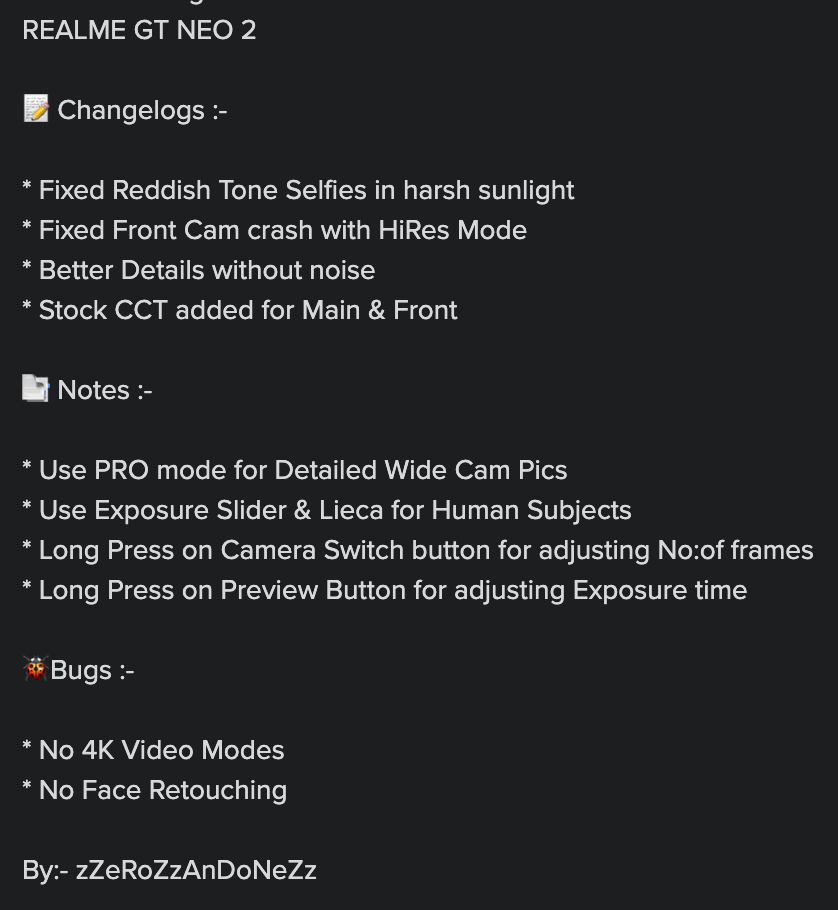
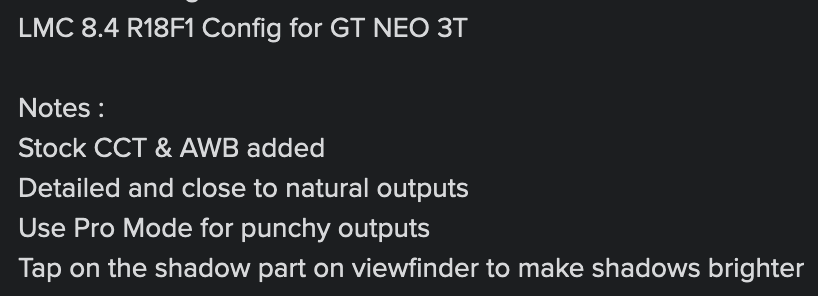
Read release-specific limits before changing video settings. The GT Neo 2 R16 contributor notes report no 4K video and no face retouching, while the Neo 3T R18F1 notes describe PRO as a punchier output option.
Read the instructions for this specific profile
Is GT Neo 3T the same target as GT Neo 3?
The listed Neo 3T files do not establish support for Neo 3.
Are creative Narzo profiles suitable for accurate product color?
Use a neutral-reference comparison first. EyeCandy and Hazard intentionally alter color, so choose a more restrained result when matching real product or clothing color matters.
Source notes: Hasli LMC8.4 R16+ community config index ↗ Hasli LMC8.4 R15 community config index ↗ GT Neo 2 R16 contributor changelog ↗ GT Neo 3T R18F1 profile notes ↗
Read the model-specific community evidence for Realme. A successful setup on another regional variant, ROM or Android version may not transfer to your phone.
Choose an exact match
Use your device’s model code and chipset where the source distinguishes variants. The entries below retain release assignments, package recommendations and unresolved details. No model in this guide was tested by us.
Try defaults first, export working settings, then import a sourced XML. Follow the installation guide and XML setup. Select the documented package rather than guessing from the phone brand.
4 matching devices. Community evidence; check the variant details.
Community XML referenceFounder-reported APK testing
Realme 9 Pro+
Start here
For a restrained-color comparison, begin with the Sharp file and an ordinary face/neutral-reference scene. If using the older stock-OS setup, follow its documented aweme package advice.
Choosing the configChoose Sharp versus the vibrant file by the subject and desired color, not by an assumed universal quality ranking. Keep 9 Pro+ distinct from 9 Pro and the separate Realme 9 SE/Speed entries.
Model-specific setup checks
Compare the selfie claim directly
The Sharp profile's source explicitly mentions selfies. Save a front-camera photo in even light and inspect skin texture and edge sharpening before using it as your default.
Use a neutral object for vibrant color
Compare the vibrant candidate with clothing or a white object in the same frame. This helps distinguish a deliberate saturation preference from a color cast.
Apply the aweme note to the documented stock setup
The older 9 Pro+ section recommends aweme for all-camera access on stock OS. Record the actual firmware and package when checking that report.
Test in this order
- Confirm the exact 9 Pro+ and save a face/neutral reference.
- Import Sharp and check rear/front capture.
- Compare the vibrant file on the same scene, then check each exposed auxiliary control.
Keep separate: Realme 9 Pro; Realme 9 5G SE; Realme 9 5G Speed
Profile source / instructions ↗ Profile source / instructions ↗
Variant limits and source evidence (3)
The R15 index explicitly says aweme is needed for all cameras on stock OS. Current files are described as grounded colors/sharp selfies and vibrant images respectively; these are source descriptions, not measured performance claims.
Realme-9-pro-plus-Sharp.xml
Release: R16+ index; exact release unconfirmed
Package: No verified package recommendation
Author: Not attributed in index
Realme-9-pro-plus.xml
Release: R16+ index; exact release unconfirmed
Package: No verified package recommendation
Author: Not attributed in index
9PRO-LMC-8.4-v.4.4.xml
Release: R15 index; exact release unconfirmed
Package: aweme on stock OS
Author: Not attributed in index
Community XML referenceFounder-reported APK testing
Realme GT Neo 2
Start here
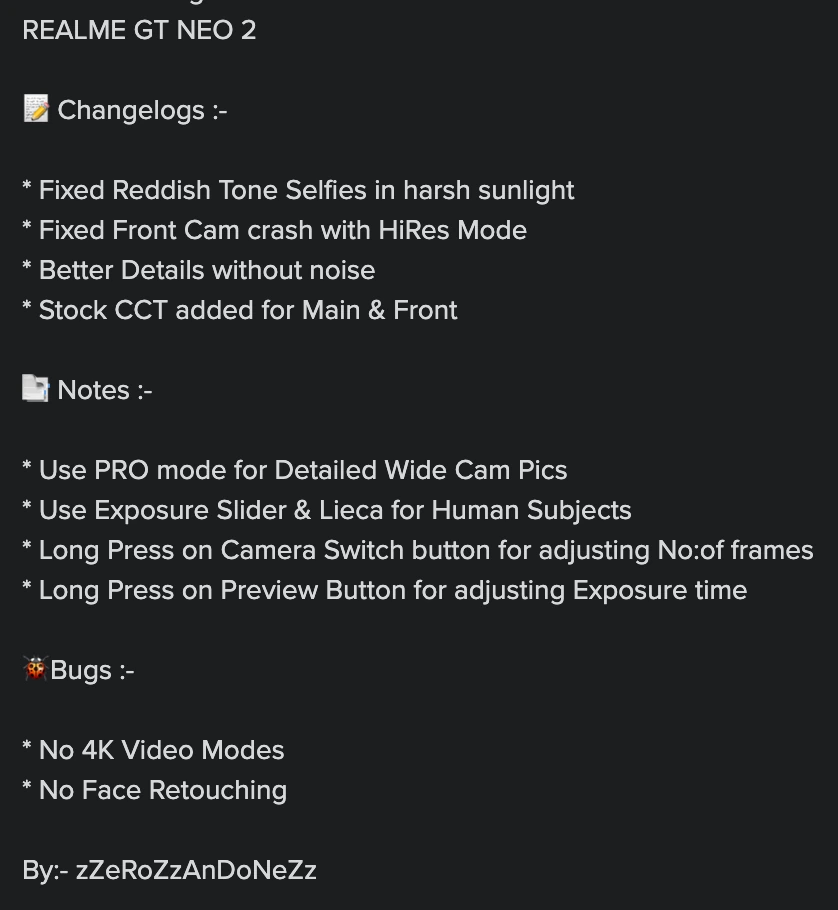
Match the installed release first: NEO-2-LMC-8.4-R18-Fix.xml for the R18 assignment or NEO-2-LMC-8.4-R16-v.1.5.xml for R16. Use the R16 notes only with their matching profile.
Choosing the configThe release-specific Neo 2 files give the clearest current match. The shared NEO23T R15 entry is an older source-assigned option rather than a replacement for every newer profile.
Model-specific setup checks
Check sunlight selfies with the R16 file
The R16 changelog reports a reddish-selfie correction and a front HiRes crash fix. Include a bright-light selfie in your comparison, keeping those improvements as contributor claims.
Learn the R16 long-press controls
Its notes describe long-pressing the camera-switch button to adjust frame count and the preview button to adjust exposure time. Change one control at a time and preserve the original values.
Keep the video limit visible
The R16 contributor notes report no 4K video and no face retouching. Do not promise either feature on the basis of this XML.
Test in this order
- Pair the exact R16/R18 profile with the matching APK.
- For R16, save a main/wide scene and a bright-light selfie.
- Check ordinary video separately and keep the documented R16 feature limits in the setup note.
Keep separate: Realme GT Neo 3; Realme GT 2
Does the GT Neo 2 R16 profile support 4K video?
The recovered contributor notes say no 4K video. That limit is scoped to this R16 profile, not every camera app on the phone.
Profile source / instructions ↗ Profile source / instructions ↗ Profile source / instructions ↗
Variant limits and source evidence (3)
Current index explicitly assigns R18 and R16. The older shared Neo2/3T entry explicitly says created with R15. The R18 description link returned 404; no extra claim is inferred from it.
NEO-2-LMC-8.4-R18-Fix.xml
Release: R18
Package: No verified package recommendation
Author: Not attributed in index
NEO-2-LMC-8.4-R16-v.1.5.xml
Release: R16
Package: No verified package recommendation
Author: zZeRoZzAnDoNeZz (attributed in contributor image)
NEO23T-LMC-8.4-R15.xml
Release: R15
Package: No verified package recommendation
Author: Not attributed in index
Community XML referenceFounder-reported APK testing
Realme GT Neo 3T
Start here
Use LMC-8.4-R18F1-GTNeo3T.xml with its R18 assignment or NEO-3T-LMC-8.4-R17.xml with R17. Keep Neo 3T separate from Neo 3.
Choosing the configThe release match is the first decision. With R18F1, the contributor's ordinary-versus-PRO description gives a useful color comparison rather than a universal 'best quality' promise.
Model-specific setup checks
Compare ordinary output with PRO
The R18F1 notes describe ordinary output as close to natural and PRO as punchier. Use the same foliage, face and neutral reference to decide how much color processing suits the scene.
Try the shadow-focus/exposure suggestion deliberately
The contributor suggests tapping a shadow area to brighten shadows. Compare the saved highlights too, so a brighter dark area does not hide lost sky or window detail.
Keep the shared R15 file in its scope
The older NEO23T profile is explicitly created with R15. It is an older alternative for the documented Neo2/3T grouping, not evidence for Neo 3 or all GT phones.
Test in this order
- Confirm Neo 3T and the matching R17/R18 APK.
- Save ordinary and PRO versions of one R18F1 scene if using that profile.
- Test a bright/shadow scene and check front/auxiliary captures before saving the chosen setup.
Keep separate: Realme GT Neo 3; Other GT models without their own entry
Profile source / instructions ↗ Profile source / instructions ↗ Profile source / instructions ↗
Variant limits and source evidence (3)
Current index explicitly assigns R18 and R17. Older shared Neo2/3T entry says created with R15. Do not confuse GT Neo 3T with GT Neo 3 or other GT models.
LMC-8.4-R18F1-GTNeo3T.xml
Release: R18
Package: No verified package recommendation
Author: Not attributed in index
NEO-3T-LMC-8.4-R17.xml
Release: R17
Package: No verified package recommendation
Author: Not attributed in index
NEO23T-LMC-8.4-R15.xml
Release: R15
Package: No verified package recommendation
Author: Not attributed in index
Community XML referenceFounder-reported APK testing
Realme Narzo 50
Start here
Confirm plain Narzo 50. Keep EyeCandy and Hazard as separate style files, with an ordinary stock/default-LMC color reference for judging their effects.
Choosing the configChoose EyeCandy for its described colorful everyday/portrait intent or Hazard for its distinct creative palette. Neither is established as the most accurate color profile or a compatibility choice for other Narzo variants.
Model-specific setup checks
Use the right subject to compare Hazard
Include an orange subject and green or gray surroundings, then inspect what the profile changes. Its palette is intentional creative processing rather than a claim of neutral product color.
Compare EyeCandy on skin and sky
Its source mentions boosted color and a vivid sky in PRO mode. Save an ordinary portrait and a sky scene separately so you can keep the option only where the effect helps.
Retain a restrained reference
For clothing, products or documentation, compare against the stock-camera reference before using a stylized file. Strong creative color can be appealing while changing the subject's apparent color.
Test in this order
- Verify Narzo 50 without A/i/5G suffix substitutions.
- Save a neutral reference, then compare EyeCandy portrait/sky output.
- Try Hazard on an appropriate colored subject and check ordinary front/rear capture independently.
Keep separate: Realme Narzo 50A; Realme Narzo 50i; Realme Narzo 50 5G
Which Narzo 50 config gives the orange and green-gray look?
The current source describes Hazard-Shoron.xml that way. It is a creative contributor profile, so keep a neutral-color alternative for subjects that need accurate color.
Profile source / instructions ↗ Profile source / instructions ↗
Variant limits and source evidence (3)
Current source describes EyeCandy as a boosted-color/portrait look and Hazard as an orange/dark-green-gray post-apocalyptic look. These are aesthetic labels. Do not extend to Narzo 50A/50i/50 5G without evidence.
EyeCandy-Shoron.xml
Release: R16+ index; exact release unconfirmed
Package: No verified package recommendation
Author: Not attributed in index
Hazard-Shoron.xml
Release: R16+ index; exact release unconfirmed
Package: No verified package recommendation
Author: Not attributed in index
LeicaVibrantShoron.xml
Release: R15 index; exact release unconfirmed
Package: No verified package recommendation
Author: Not attributed in index
No verified recommendation in our catalog. Check your exact variant and source notes; a similar model is not enough.
Keep a simple setup record
Save these details with your backup. They make it possible to repeat a working setup or describe a problem accurately.
Phone model / region
________________________
ROM and Android version
________________________
Full APK filename
________________________
Android package ID
________________________
XML filename / library
________________________
Lens and mode that you tested
________________________
Copy this checklist into your own notes. This page does not submit or save your device information.
Sources & review
Source access: 14 October 2026. Release dates are shown separately. APK testing is reported by founder Muzamil Ahad; individual phone-test records are not currently published.
Founder & APK reviewer: Muzamil Ahad. How the guide was researched · Report a correction.