
Read the full model number in Settings > About phone, then check the device's regional specification. Keep this information with the XML filename.
LMC 8.4 for Samsung: Device Evidence & XML Configs
LMC 8.4 for Samsung: choose the hardware variant before the XML
Samsung results need two decisions: the exact Galaxy model and its regional hardware variant. The strongest release-specific entries in this catalog are the S23 Ultra and M51, with separate R16, R17 and R18 profiles. S20 FE, S21 Ultra and S22 Ultra require closer attention to Snapdragon/Exynos labels. The S24 entry is expressly for Snapdragon; an S24 search alone is not enough to select it.
For S23 Ultra or M51, select the profile whose documented release matches the installed APK. For S22 Ultra, choose the older Snapdragon or Exynos profile deliberately.
Treat the A71 and A73 files as community starting points with sparse setup notes. Confirm each saved camera mode before using the setup for an occasion.
Package and firmware guidance
The R15 source recommends ruler or scan3d for M51, S20 FE, S21 Ultra, S22 Ultra and S23 Ultra. The newer S23 Ultra R16 entry says to choose a Samsung package without naming one. These are model/profile-scoped recommendations; the indexes do not establish a universal package for A71, A73 or Exynos S24.
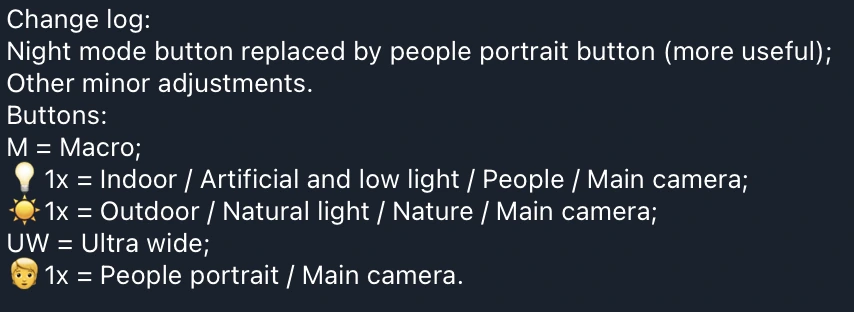
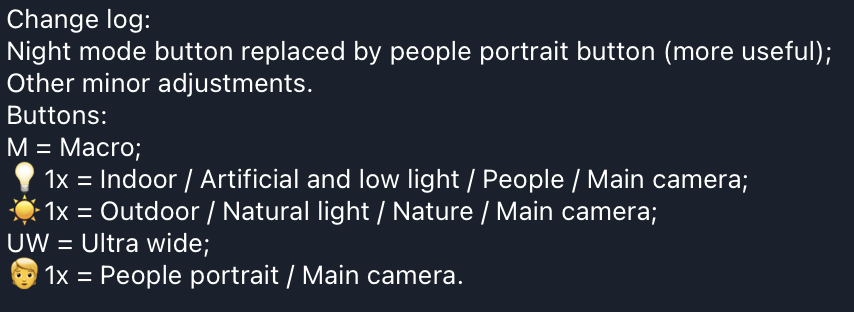
Samsung profile controls can be subject-specific rather than simple zoom switches. M51 EACv9, for example, has separate 1x buttons for indoor/artificial light, outdoor/nature and people portraits.
Read the instructions for this specific profile
Does scan3d make every Samsung camera work?
No such guarantee is established by these sources. Follow the documented package advice for the exact model, then test main, front and each exposed auxiliary lens separately.
Can I use the Snapdragon S24 profile on Exynos?
The listed S24 profile explicitly excludes Exynos. This catalog has no verified Exynos S24 recommendation.
Source notes: Hasli LMC8.4 R16+ community config index ↗ Hasli LMC8.4 R15 community config index ↗ M51 EACv9 R17 button legend ↗
Read the model-specific community evidence for Samsung. A successful setup on another regional variant, ROM or Android version may not transfer to your phone.
Choose an exact match
Use your device’s model code and chipset where the source distinguishes variants. The entries below retain release assignments, package recommendations and unresolved details. No model in this guide was tested by us.
Try defaults first, export working settings, then import a sourced XML. Follow the installation guide and XML setup. Select the documented package rather than guessing from the phone brand.
8 matching devices. Community evidence; check the variant details.
Community XML referenceFounder-reported APK testing
Samsung Galaxy S20 FE
Start here
Confirm the regional hardware variant first. On the source's Snapdragon target, start with 25_4_23_setting_preference.xml and an unchanged photo mode before comparing the more customized file.
Choosing the configChoose the simple Snapdragon-labelled entry to establish a reference. If you try the jrosatti profile, its source describes tele, ultrawide, wide, front and wide black-and-white controls plus tone-curve/upscale changes; check each control's actual saved output.
Model-specific setup checks
Read the exact S20 FE variant
Use the full model number and regional specification rather than the S20 FE product name alone. The Snapdragon-labelled recommendation is not evidence for an Exynos S20 FE.
Keep effects separate from lens tests
With the jrosatti profile, test ordinary wide output before black-and-white or upscaling. That makes it easier to tell a lens-switch problem from a deliberate processing effect.
Use the older basic file as a controlled alternative
The older s20fe_snap_lmc8.4r15_basic.xml has model and Snapdragon labels. Keep its R15-index scope visible, and change only the XML when comparing it with a working setup.
Test in this order
- Save a daylight main-camera reference with the simple profile.
- Try every exposed front/auxiliary control and confirm that the saved view changes.
- With the custom profile, compare wide color and wide black-and-white separately; check file size if upscaling is enabled.
Keep separate: Exynos S20 FE for Snapdragon-labelled files; Galaxy S20; Galaxy S20 Ultra
Profile source / instructions ↗ Profile source / instructions ↗
Variant limits and source evidence (3)
The current index explicitly labels the first profile Snapdragon. Do not extend that listing to Exynos S20 FE variants. ROM, Android version and front-camera behavior are not comprehensively documented.
25_4_23_setting_preference.xml
Release: R16+ index; exact release unconfirmed
Package: No verified package recommendation
Author: Not attributed in index
Lmc8-4r17-S20fe-ds-DefAuxLibBW-by-jrosatti.xml
Release: R16+ index; exact release unconfirmed
Package: No verified package recommendation
Author: Not attributed in index
s20fe_snap_lmc8.4r15_basic.xml
Release: R15 index; exact release unconfirmed
Package: ruler or scan3d (source R15-index recommendation)
Author: Not attributed in index
Community XML referenceFounder-reported APK testing
Samsung Galaxy S21 Ultra
Start here
For an Exynos phone considering the older profile, plan around the documented front-camera limitation. For HK-Leica, check the 3x night result early instead of evaluating only daylight main-camera photos.
Choosing the configThe current HK-Leica entry provides a concrete zoom/night warning but leaves chipset scope unspecified. The older Exynos entry is clearer about hardware and front-camera behavior; neither establishes a complete all-camera setup on every firmware.
Model-specific setup checks
Test the known 3x case
Take the same low-light subject with 1x and 3x, then inspect the saved brightness. If HK-Leica's 3x picture is too dark, retain another working option for that situation.
Check selfies before choosing an everyday profile
The source specifically reports that the older Exynos S21U-R15-HDR profile does not support the front camera. Keep the stock-camera selfie path available if that limitation appears on your phone.
Do not infer chipset from the Leica label
HK-Leica is a contributor profile name. Resolve the phone's variant and verify lens behavior rather than treating that name as a Snapdragon or Exynos assignment.
Test in this order
- Compare main-camera daylight color with the stock camera.
- Check 3x under dim light using the same subject and position.
- Switch to the front camera and save a photo before relying on the setup.
Keep separate: Galaxy S21; Galaxy S21 FE
Why does the S21 Ultra 3x camera look darker at night with HK-Leica?
The contributor identifies darker 3x night pictures as a known profile issue. Compare a main-camera shot and retain a working alternative for the scene; this website has not measured the effect.
Profile source / instructions ↗ Profile source / instructions ↗
Variant limits and source evidence (2)
The current HK-Leica profile does not specify chipset. Its source reports darker 3x zoom images at night. The older S21U-R15-HDR profile explicitly targets Exynos; its source says rear cameras work but the front camera does not.
HK-Leica-S21U.xml
Release: R16+ index; exact release unconfirmed
Package: No verified package recommendation
Author: Not attributed in index
S21U-R15-HDR.xml
Release: R15 index; exact release unconfirmed
Package: ruler or scan3d (source R15-index recommendation)
Author: Not attributed in index
Community XML referenceFounder-reported APK testing
Samsung Galaxy S22 Ultra
Start here
Identify Snapdragon or Exynos before importing the older profile: S22U-SD-LMCr15-ArcideV7.xml and LMC-S22U-Exynos.xml are separate choices.
Choosing the configUse the explicitly labelled older hardware entry when you need a clear variant match. Treat the newer javasabr profile as a separate community experiment whose chipset and release scope require confirmation.
Model-specific setup checks
Keep two hardware profiles apart
Name saved backups with SD or Exynos alongside the APK release. This prevents an accidental cross-variant import when several S22 Ultra files are in the same folder.
Separate S22 Ultra from S22/S22+
The index has a different S22/S22+ heading. A base-model R18 assignment cannot be transferred to the Ultra listing simply because both say S22.
Follow the package note at its documented scope
The older S22 Ultra section recommends ruler or scan3d. After installing a matching build, establish main-camera photo saving before trying auxiliary buttons.
Test in this order
- Load the file whose explicit hardware label matches the phone.
- Save main and front photos, then test each exposed rear lens.
- Compare the newer profile only after preserving the working hardware-specific setup.
Keep separate: Galaxy S22; Galaxy S22+; Opposite chipset variant for SD/Exynos-labelled files
Which S22 Ultra XML should I use: Snapdragon or Exynos?
Match the phone's regional hardware variant to the explicit source label. The files are separate, and this catalog does not establish that one substitutes for the other.
Profile source / instructions ↗ Profile source / instructions ↗
Variant limits and source evidence (3)
The newer index profile does not specify regional chipset. The R15 index provides separate Snapdragon and Exynos files; keep those separate. A package choice cannot remove all hardware and ROM differences.
javasabr_lmc17_s22u_v1
Release: R16+ index; exact release unconfirmed
Package: No verified package recommendation
Author: Not attributed in index
S22U-SD-LMCr15-ArcideV7.xml
Release: R15 index; exact release unconfirmed
Package: ruler or scan3d (source R15-index recommendation)
Author: Not attributed in index
LMC-S22U-Exynos.xml
Release: R15 index; exact release unconfirmed
Package: ruler or scan3d (source R15-index recommendation)
Author: Not attributed in index
Community XML referenceFounder-reported APK testing
Samsung Galaxy S23 Ultra
Start here
Read the installed LMC release, then select its corresponding documented S23 Ultra file. Keep the exact filename and APK package in the backup name.
Choosing the configRelease alignment provides a firmer starting point than a universal 'best S23 Ultra XML' claim. The R16 jajo entry also tells users to choose a Samsung package without naming an exact option.
Model-specific setup checks
Avoid a release mismatch
If the installed APK is R17, begin with the R17-assigned file instead of jumping to the R18 file because it appears newer. Compare upgrades as an APK-and-profile pair.
Check auxiliary lenses after the main camera
Photograph the same distant subject with each exposed lens control and inspect the saved field of view and detail. A visible zoom button is not enough to prove that the intended lens is active.
Keep the base S23 file separate
The source provides distinct S23/S23+ and S23 Ultra entries. Select the Ultra filename rather than the similarly named base-series JavaSaBr profile.
Test in this order
- Confirm the installed release and choose the same-release profile.
- Save a main photo and one photo from each exposed rear lens.
- Check a front photo and a low-light scene before adopting the pair as your default.
Keep separate: Galaxy S23; Galaxy S23+; Galaxy S23 FE
Is there a separate LMC R16, R17 or R18 config for S23 Ultra?
Yes. The source explicitly assigns the three listed profiles to those releases. That assignment is contributor evidence rather than a firmware-wide test by this website.
Profile source / instructions ↗ Profile source / instructions ↗
Variant limits and source evidence (4)
The index explicitly assigns R18, R17 and R16 to these current files. The R16 entry says to pick a Samsung package. Full camera/ROM coverage has not been tested here.
JavaSaBr_lmc18_s23u_v1
Release: R18
Package: No verified package recommendation
Author: Not attributed in index
JavaSaBr_LMC_17_v13_S23_Ultra
Release: R17
Package: No verified package recommendation
Author: Not attributed in index
S23U-jajo-LMC_R16-22.xml
Release: R16
Package: a Samsung package (exact option not specified in this entry)
Author: Not attributed in index
javasabr-lmc15-v14.xml
Release: R15 index; exact release unconfirmed
Package: ruler or scan3d (source R15-index recommendation)
Author: Not attributed in index
Community XML referenceFounder-reported APK testing
Samsung Galaxy S24
Start here
Confirm the regional hardware variant. For the source's Snapdragon target, consider zZeRoZzAnDoNeZz_2025-03-10 with R18; for Exynos, stop at 'no verified recommendation in this catalog'.
Choosing the configThe explicit Snapdragon/R18 scope is the reason to shortlist this file. Shared S24/S24+ wording does not include S24 Ultra, and older-generation suggestions should remain optional experiments.
Model-specific setup checks
Resolve region before downloading
Keep the complete S24 model number with its regional hardware specification. The same marketed S24 name is insufficient to select the Snapdragon-only entry.
Use the documented R18 pair first
Once the hardware matches, verify an ordinary main-camera photo before adding old S22/S23 profiles. This gives you a useful baseline for any later comparison.
Record failure at the exact mode
If one camera fails, note the package, Android/One UI version and failing lens. 'S24 crashes' is less actionable than a reproducible mode-specific report.
Test in this order
- Verify Snapdragon hardware and the R18 APK.
- Save main and front photos with the listed profile.
- Check any exposed auxiliary lens individually and preserve the last working setup.
Keep separate: Exynos S24; Galaxy S24 Ultra
Can Exynos S24 use this LMC 8.4 profile?
The listed profile explicitly says Snapdragon only. These sources do not establish an Exynos S24 recommendation.
Variant limits and source evidence (1)
The current listing groups S24/S24+ and explicitly says Snapdragon only. No Exynos recommendation is verified in these two indexes. Older S22/S23 profiles are only suggested as possibilities requiring testing.
zZeRoZzAnDoNeZz_2025-03-10
Release: R18
Package: No verified package recommendation
Author: Not attributed in index
Community XML referenceFounder-reported APK testing
Samsung Galaxy M51
Start here
Match the EAC profile to the installed release. With R17 EACv9, read the button legend before treating every 1x button as identical.
Choosing the configUse LMC8.4R18_M51_EACv7.xml with its R18 scope, EACv9 with R17 or EACv6 with R16. The older EACv3 has a source-reported R15 test, so keep that claim attributed to the contributor.
Model-specific setup checks
Choose 1x for the lighting
In R17 EACv9, the bulb-marked 1x is intended for indoor/artificial or low light, and the sun-marked 1x for outdoor/nature. Compare them on the same scene to learn the processing difference.
Use the dedicated people choice deliberately
The R17 changelog replaces a night button with a people-portrait main-camera button. It is a profile-specific interface change; older XML button layouts may differ.
Check macro and UW as separate modes
The same legend labels M as macro and UW as ultrawide. Save one focused sample from each after the main camera works, rather than assuming the labels establish successful capture.
Test in this order
- Load the same-release EAC profile and save a main-camera reference.
- With R17 EACv9, compare indoor and outdoor 1x on suitable lighting.
- Check people portrait, UW and M separately; keep the prior XML backup.
Keep separate: Galaxy M52; Galaxy M53; Galaxy A51 without its own entry
Why are there several 1x buttons in the M51 config?
EACv9's R17 instructions assign them to indoor/artificial light, outdoor/nature and people portraits. They are processing/subject choices for the main camera.
Profile source / instructions ↗ Profile source / instructions ↗ Profile source / instructions ↗
Variant limits and source evidence (4)
Current source explicitly records profiles created with R18, R17 and R16. The older profile is source-reported tested with R15, not tested by this website. Custom button layouts and camera behavior depend on the selected file.
LMC8.4R18_M51_EACv7.xml
Release: R18
Package: No verified package recommendation
Author: eacampos
LMC8.4R17_M51_EACv9.xml
Release: R17
Package: No verified package recommendation
Author: eacampos
LMC8.4R16-M51-EACv6.xml
Release: R16
Package: No verified package recommendation
Author: eacampos
LMC8.4R15M51EACv3.xml
Release: R15
Package: ruler or scan3d (source R15-index recommendation)
Author: Not attributed in index
Community XML referenceFounder-reported APK testing
Samsung Galaxy A71
Start here
Confirm the full A71 model number and avoid selecting this entry by an A71 5G search alone. Save a main-camera daylight photo with default LMC before importing Samsung-Galaxy-A71.xml.
Choosing the configThis file is shortlisted because of its exact A71 heading, not because the source ranks it or verifies every camera. Keep its 'R16+ index; exact release unconfirmed' scope visible.
Model-specific setup checks
Build an A71 baseline before the import
Take a face, a white object and a shaded textured surface in one ordinary scene. The same samples make color casts and excessive sharpening easier to judge after loading the sparse profile.
Check the front camera early
The A71 entry lacks a front-camera report. Include a saved selfie in the initial check so that a good rear photo does not obscure a mode you regularly need.
Do not copy another Samsung package rule silently
The A71 section does not supply the older S-series ruler/scan3d advice. Keep package choice as an unresolved setup detail unless a relevant instruction substantiates it.
Test in this order
- Save a stock/default-LMC main-camera comparison.
- Import Samsung-Galaxy-A71.xml and repeat the scene.
- Save a front photo and each exposed auxiliary lens; record the APK/package and firmware.
Keep separate: Galaxy A71 5G without matching evidence
Variant limits and source evidence (1)
Only a community config listing is verified. The source does not specify chipset, region, package, Android version or tested release; do not assume A71 5G or all ROMs are covered.
Samsung-Galaxy-A71.xml
Release: R16+ index; exact release unconfirmed
Package: No verified package recommendation
Author: Not attributed in index
Community XML referenceFounder-reported APK testing
Samsung Galaxy A73
Start here
Use the exact A73 listing as a community trial. Photograph foliage alongside a neutral object with the current setup before importing Green-City-Nature.xml.
Choosing the configThe exact A73 heading justifies a shortlist; the name's City/Nature wording does not supply a validated look description. Judge the imported result against the reference rather than a promised effect.
Model-specific setup checks
Use foliage plus a neutral reference
A green subject alone can conceal a color cast. Include a white or gray object when comparing this nature-named profile, and inspect both in the saved photograph.
Check fine textures at equal size
Compare leaves, hair or fabric at the same viewing size rather than comparing only the overall saturation. Retain the profile only if its processing suits your subject.
Document the release before sharing results
The index does not assign this file to a specific LMC release. Record the actual APK and firmware with any success report so another A73 owner has a reproducible starting point.
Test in this order
- Save foliage and a neutral-reference photo before import.
- Load Green-City-Nature.xml and repeat the same scene.
- Check front and exposed rear controls, then note which modes actually saved successfully.
Keep separate: Galaxy A72
Variant limits and source evidence (1)
Only a community config listing is verified. Region, exact release, package and all-camera behavior are not documented in the index.
Green-City-Nature.xml
Release: R16+ index; exact release unconfirmed
Package: No verified package recommendation
Author: Not attributed in index
No verified recommendation in our catalog. Check your exact variant and source notes; a similar model is not enough.
Keep a simple setup record
Save these details with your backup. They make it possible to repeat a working setup or describe a problem accurately.
Phone model / region
________________________
ROM and Android version
________________________
Full APK filename
________________________
Android package ID
________________________
XML filename / library
________________________
Lens and mode that you tested
________________________
Copy this checklist into your own notes. This page does not submit or save your device information.
Sources & review
Source access: 14 October 2026. Release dates are shown separately. APK testing is reported by founder Muzamil Ahad; individual phone-test records are not currently published.
Founder & APK reviewer: Muzamil Ahad. How the guide was researched · Report a correction.